Free on the App Store

Tennis tracking on your wrist.
Nothing else to carry.

Swingli runs entirely on your Apple Watch. Every forehand, backhand and serve counted automatically — no phone on court, no camera, no subscription.

Download Swingli tennis tracker app on the App Store Requires iPhone & Apple Watch
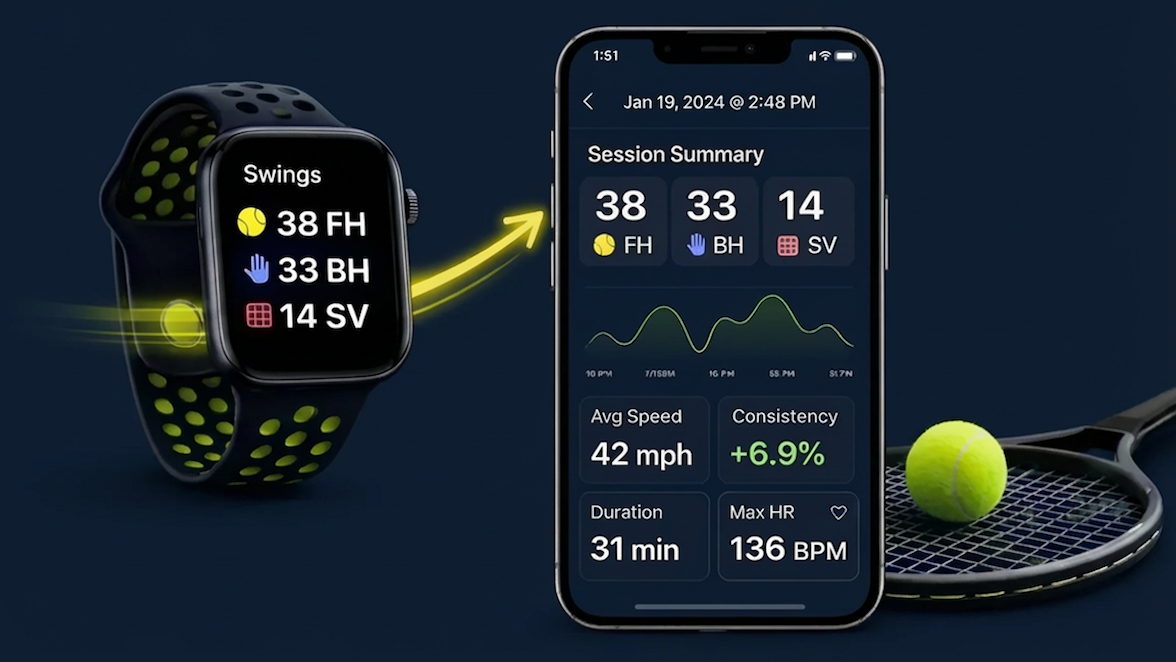
Swingli tennis tracker app on iPhone and Apple Watch displaying real-time swing tracking and performance analytics

Everything you need, on the watch you already wear

watch

Watch-First

Everything runs on your Apple Watch. No tripod, no camera, no phone on court.

sports_tennis

Swing Detection

Automatic forehand, backhand, and serve recognition using motion sensors.

speed

Speed Analytics

Track the velocity of every swing and monitor your power over time.

favorite

Health Stats

Heart rate, calories, and workout duration synced with Apple Health.

insights

Session History

Review every session with detailed breakdowns and performance trends.

lock

Privacy First

Your data stays on your device. No accounts, no tracking, no ads.

Start tracking in 3 easy steps

Tennis player wearing Apple Watch using Swingli to track swings during a match
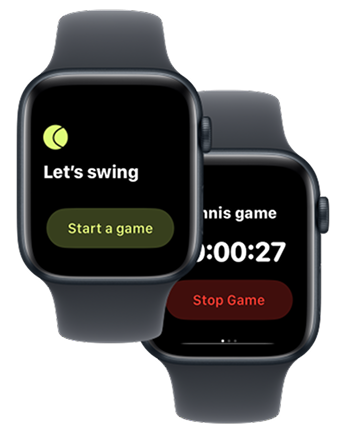
Apple Watch screens showing Swingli tennis tracker interface with swing count and speed metrics
1
Download the app and pair your Apple Watch with your iPhone.
2
Tap "Start Game" on your watch and play. Every swing is tracked automatically.
3
End your session and view full stats on iPhone: swing speed, stroke breakdown, rallies and health data.
Community

Join the Swingli community

Follow us on Instagram for tips, updates, and stories from players like you.

Follow @swingliapp

Ready to play smarter?

Download Swingli free and start tracking your next session.

Download on the App Store Requires iPhone & Apple Watch *Demo imagery. Actual app experience may vary.